Author: beast

rtert
From The Blog

How Creating How-To Videos Can Benefit Your Business

No Comments

Have you ever wondered How Creating How-To Videos Can Benefit Your Business? How-to videos are great for people wanting to learn how to do something because like the name suggests they show people how to do something. But how can your business benefit from creating them, for your social media platforms and marketing campaigns, well we spoke to film director Lawrence Jacomelli to see if he thought businesses could benefit from making how-to videos. Firstly we are going to cover how to make one, using the example of a Los Angeles Travel company to describe the process. What Is A How-To Video Well it’s pretty self explanatory what it is, but we will go into more detail. A How-To video or tutorial is a short video that teaches people how to do something (like we said pretty self explanatory.) But they are incredibly useful if you get them right, if you make sure you are teaching something you know and are an expert about then you can’t really go wrong. What sort of videos could you make though? Using our example of a Los Angeles based travel company you could create videos such as, how-to have a good time in LA, how to plan your holiday in Los Angeles, these are perhaps more fun how-to videos than some others you could do but not all how-to videos need to be boring but as long as they can provide value then it will be a great video. How Do You Make A How-to Video? When creating a how-to video the first thing you need to look at is what can provide value to your viewers, so for example, if you were the LA-based travel company we are using as an example you would look at videos that provide value to people wanting to visit the USA, so one example would be how to apply for a visa, which would help people through the process of applying for a visa, it might not seem like the most entertaining video but people will watch it as it makes a slightly hard process significantly easier. The next thing to consider is the production quality. You want to come across in the most professional way and achieve the quality that you would expect from a top London production company. One good way to make a how-to video would be an animation, its significantly cheaper to make an animation than it would be to film your own video, also stats show that 65% of people are visual learners, and 90% of the information transmitted to the brain is visual. One thing we would say thought about using animation is that animation is really best for advertising services that don’t use physical products so it would be great for digital marketing companies whereas a live-action video would be fit for something with a product so example if your company sells scooter you could make a how-to video on how to put one together and customize it. Where Should You Post Your How-To Video? This may seem like a bit of a redundant question but it can really be a good thing to think about if you want to really maximise the reach of your video, the obvious option is YouTube, which is a given considering YouTube is the second largest search engine behind only Google, that really is a massive benefit in itself but are there any other benefits to putting your how-to videos on youtube. No there are loads of other benefits to talk about, since YouTube is the second largest search engine you can potentially open your business to the 2 billion active monthly users on YouTube. Another great benefit of youtube is that their metrics are a factor taken into consideration by Google when ranking pages. If you can create high-quality how-to videos that your potential customers like, comment and share, you’re signalling to Google that you are producing content that is valuable to your target audience. But what other options are there apart from youtube, well one massive option would obviously be your website, by having video on your website you again boost your search ranking on google, also stats from the guys over at Unbounce show that people who include video into their marketing and website boost their conversion rate by 34%. How Can A How-To Video Benefit Your Business Posting short how-to videos on your social media is a great way to provide a quick bit of value to your followers. Having the video include a CTA , call to action, is a great way to get people onto your email marketing list for a start which could lead to more conversion. As a London production company we often post how-to videos about our work in order to entertain, educate and build trust with our clients. How-to videos show potential customers of your brand that you are an expert in your respected field and know what you are talking about. Making sure your video is optimized for mobile use as well opens up a new audience and many benefits because video and mobile go hand in hand. 90% of consumers watch videos on their mobile.  Since people like to watch videos on the go, and the number of smartphone users is growing, your video audience keeps getting bigger and bigger. Google also loves video, so by including how-to videos on your website you can potentially boost your ranking on the search engine which can be an excellent opportunity for you and your business because Google shows 10 results on the first page when someone searches for any specific terms. The results are based on a number of issues like site speed, backlinks, bounce rate, and a host of other factors. Should You Make A How-To Video? We think you should, as most American and LA-based businesses do but if you can find a decent formula to provide value to your customers without giving away your whole process then absolutely. But we

Read More

From The Blog

Ten Mistakes Beginner Filmmakers Make


No Comments

Here are Ten Mistakes Beginner Filmmakers Often Make Here at Beast production company London we’re all experienced filmmakers. We have worked on hundreds of video productions  in the UK and abroad over the past 25 years and seen a lot but we’ve also made mistakes especially when we were starting off. We thought we would help the next generation of filmmakers by going through the ten mistakes beginner filmmakers make and how to prevent them. What FPS Do I Use? First on our list is by far the most frequent mistake that we see everybody make when they’re starting out is filming in 30 frames per second. Or even worse, 50 or 60 frames per second. We’ve done it ourselves. You think well the more frame rates the better, right? Wrong, you want to stick to 24 frames per second. This is the most cinematic look there is. A lot of people don’t even realize that there’s a difference in the look between 24 frames per second, 30, 50, and 60. When we’re talking about the quality of the image, when you’re trying to make something really cinematic, stick to 24 frames per second. Control Your Camera! Number two, people buy DSLRs and then they just set it in auto, and that’s it. That is a massive mistake that video production beginners make. Not only does it make you a more mediocre filmmaker because you don’t actually know how to control your camera. But you’re also giving away many creative choices to this little robot of a brain in your camera. That doesn’t carry out the best job. You’re giving away a lot of your creative choices. Especially the F stop, that is probably the most creative choice that you can consider while you’re filming, what F stop you’re going to film at. So don’t film in auto, learn how to use manual controls. What ISO? Third on our list is using way too high of an ISO when you actually don’t need to. We see this all the time with people who are learning filmmaking, and people are like why doesn’t my footage look as good as this other person’s footage from the same camera and it’s just because you’re using a really high ISO when you actually don’t need to. The only time you boost your ISO is if there’s not enough light. There’s in fact a base ISO, which is the best ISO for that camera, it’s varied for every camera. This is the ISO that your camera is going to perform best at, the dynamic range, the amount of noise. All that is going to be the best so make sure you stick to the base ISO. Don’t Overexpose! Number four, this one’s extremely common with beginner filmmakers, is overexposing or underexposing, so you’re just making your image too bright or too dark. Your footage is not going to look good when you go to post and you start colour grading. It doesn’t look good if you’ve neglected detail in the highlights or lost detail in the shadows so yeah you’re going to be really struggling. Essentially just use a histogram or better yet, a waveform cause you can’t always trust your eyes just looking at the LCD screen. If everything is over the left side on your histogram, that means you’re underexposed, and if everything is over to the right on your histogram that means you’re overexposing. You want it kind of in the middle. Do You Need To Colour Grade? The fifth point on our list is that filmmakers don’t colour grade their footage. You’re missing out on a massive step. Especially if you’re filming in log, you have to colour grade. It’s just going to look bad if you don’t. It’s going to make you more unique, even if it’s just using a LUT or something and putting down no pass, just colour grade your footage. Do You Need Lights? Our next point is not using lights. We know when you are starting off in video production there are loads of things that you need to buy. Lights aren’t quite so high up on the list, you want to buy cameras and lenses and all that other stuff first, so that’s fair, but at least use natural light. There’s always some sort of light source around you that you can use whether it’s a window or just a light in your house. Just look around in your room or in your setting and find out what’s the brightest thing there, and then just use that. That’s your light, easy as that. Do I Need A Microphone? Number seven is bad audio, which is common in beginner filmmaker’s films, and we’re not talking about not using a microphone. We highly recommend investing in a microphone very early on, it’s going to do way more for your videos than something like a gimbal. But really what we’re talking about is the audio’s peaking or its way too low. Basically, where you want your audio is about -12 decibels. That’s where you kind of want the audio to be hitting. You don’t want to hit red, that’s bad, and then afterwards, you can tweak it in post. But -12, that’s kind of where you want your audio to hit while you’re recording. Shaky Footage Or Smooth Footage? Then we have the classic shaky footage, and this is something that we’ve all done while filmmaking. We pick up the camera, and we put it into video mode and we start filming and it’s just shaking everywhere. It doesn’t look good and don’t use the excuse of saying that you’re trying to make it look raw or something like that. There are a time and place for that but most likely, you weren’t using it for that purpose. Buy a monopod, a GorillaPod, a tripod, a gimbal, anything to stabilize your footage. It’s going to be way better than that jittery footage. What Music Should I Use

Read More

From The Blog

Three Tips On How To Start A Profitable YouTube Channel


No Comments

Three Tips On How To Start A Profitable YouTube Channel If you are thinking about starting your own YouTube channel then you will probably be thinking about the following questions: How do I start a YouTube channel? Can I make money off YouTube? Is YouTube still profitable in 2020? Well in 2020 a lot has changed around how YouTube works. Knowing these changes we decided to put together this article that’s going to cover three tips on how to start a profitable YouTube channel in 2020. These ideas are going to make sure you’re doing things right and setting yourself up to make money on YouTube, things are changing all the time and you need to make sure you’re following the most up-to-date information and also avoiding the latest mistakes, that’s exactly what this article is going to teach you how to do. What Channel Categories Are Most Profitable? So let’s get started our first idea for anyone starting a YouTube channel in 2020 to make money is you need to make sure you’re building your channel within the right category. There’s certain topics that you can build your channel around and focus your videos on and these topics are going to determine how many views you get and how much YouTube pays you for the advert shown on your channel. The topics that have opportunities around them changes from year to year so you need to make sure you’re focusing on a topic that’s lucrative in 2020. One of the ways we can find out what topics have the most potential around them is we can look at the youtubers rich list of 2019 so this shows us the youtubers that made the most money in the last 12 months and we can actually look through this list and see what topics those youtubers focus on. What YouTube Channels Are Profitable In 2020? So what’s profitable right now in 2020? If you scroll through this list we can see that we’ve got a gaming channel, another gaming channel and another gaming channel, a channel that started on games and PewDiePie. The first five richest youtubers are old gamers, we’ve then got a makeup channel, a channel that has like a daily talk show, a channel aimed at kids and to top it off the top youtubers is a channel aimed at kids. Just from looking at that list we can get some ideas straight away that some popular categories in 2020, they’re going to be making people a lot of money are gaming channels and make up channels so if I was starting my channel today I could look at this list and think maybe I’m going to become a popular makeup blog, I could start making videos on makeup. We can also look at lists that show the 21 profitable YouTube channel ideas that you can follow to make the most money on the platform, we can see we’ve got makeup on there, gaming, food, yoga, fitness and so on. If you’re starting in 2020 you can use lists like this to guide you to make sure you’re starting your channel looking at the right topic. We can see UK production company is number 11 as a profitable YouTube channel idea. Finding the most profitable channel categories of this year 2020 and making a channel within that category is our first idea for you if you wanted to start a channel and make money in 2020. Can I Stop YouTube From Taking My Money Away? The second idea we have for you if you want to start a channel this year and make money is make sure you’re not letting YouTube take money away from you, so what do we mean by this? Well YouTube has a lot of rules, regulations and guidelines and if you break those rules YouTube can decide to either give you no money at all or a miniscule amount of money, so it’s important to keep track of policy changes every year and make sure that your channel is compliant with any of the recent policies YouTube has in place now. A recent example of these YouTube’s policy changes in 2020 is YouTube decided to actually blacklist kids channels, so any channels making content aimed at children is going to be heavily de-monetized. This means that those top ten youtubers from last year that had like the top spot or the third spot on the most richest YouTube channel last year may not in 2020 because YouTube is now punishing channels that have kid focused content. Check Those Rules! We would recommend to check the rules every other month just to make sure your still complying with everything, also when you choose to upload a video its best to upload it a couple of days but not post straight away as YouTubewill still check if your video can be monetised, this would save you from having to delete and re upload over and over until your video Is monetised.  Just remember idea number two in general make sure that YouTube isn’t taking money away from you by staying compliant with the most recent policy changes. Are there any other ways to monetise your channel? Our third and final tip for your YouTube channel to get you started in making money in 2020 is that you need to explore other ways of monetizing your audience outside of YouTube, so most people when they’re starting a YouTube channel they only really think about the amount of money that YouTube is going to pay them for the adverts that are shown on their channel and that’s all well and good. But there are so many missed opportunities that you’re just not seeing so to start one thing you could do is you could start offering your merchandise to your audience so you could get a graphic designer to design a logo for your channel, or like a catchphrase that you use in your channel and you

Read More

From The Blog

How to market and grow content in London


No Comments

How to market and grow content in London When starting a digital content agency in London it can be tough to get your first few clients so marketing your digital content agency is crucial, especially in the ever competitive market of London. Here at Beast Production Company London we have experience in helping all sorts of companies with their digital marketing…even other London digital content agencies! So if you want to know how to market a digital content agency in London then this is the article for you. In this article we are going to give you five tips to help market and grow your digital content agency. Create A System to grow content in London Number one is to create systems. Running a digital content agency in the London can be incredibly time consuming, more so when you’re meeting with client after client so we implement systems to make the process more efficient. An example of a system that we implemented a few years ago that just works amazingly is writing a list of seven to ten questions that we asked potential customers that come to us with video production inquiries. Having your go to seven to ten questions which is essential a creative video brief, you can either send a client through an email or you can ask them on the phone. This is one less thing you have to think about every time you do it and you’ll get a lot of information in return, questions like what kind of video are you looking for? Ask them if they have a location that they’d like to film at or if they require a studio rental, ask them if they’d like to have people speaking on camera from their company or are they hoping to have actors hired in their video.          What Questions Do We Ask? A question we love to ask is have you done videos in the past if they have created videos in the past, chances are they’re either not happy with the previous London Production Company they worked with or if the videos were created so long ago that they’re looking to revamp their image and create modern videos you can then ask them well what was it about your old videos that you didn’t like so that we can make them better that this time around. It’s also great to see videos that were created in the past because that helps you understand what quality of video production they’re looking to exceed. You can also ask them if they have a rough budget in mind. It is important to get clear on whether or not this potential client expects a big £50,000 production with a £500 budget because that does happen especially with potential clients that have never done video before. But you definitely do want to exceed your client’s expectations but you don’t want them to have unattainable expectations that you aren’t going to be able to achieve. Should You Fake It Till You Make It? A quite famous saying is fake it till you make but here at Beast Production Company UK we don’t believe in that. We are a very transparent company, we don’t give false promises to our clients as that’s just not us. However a lot of production companies in London do this so our next tip explains that you need to be honest about what you’re capable of and what you’re not capable of, don’t make promises that you know you can’t keep. A rule that we have implemented in our business is we will tell clients that something is going to take twice as long as we actually expect it to take especially with editing, that way we can pleasantly surprise them and exceed their expectations when we do deliver and edit early but we also have a little bit of leeway because you never know what could come up. Be realistic with yourself and your client about how long lighting takes to set the location how long interviewing someone on camera and getting them comfortable with the questions takes, they might need a little bit of coaching with how to deliver a sentence, they might need to do it take a few times. So be honest about how long it will take with pre-production, production and post-production to deliver those best results. Keep It Cheap? Or Splash Out? Our third tip is to not waste your money on a lot of fancy new gear, when working in london you have to compete with massive digital content agencies with all their fancy equipment so it can be tempting to splash out especially when you’re starting out, but in most cases having a decent DSLR camera with a few different lenses, a basic lighting setup and lavalier mics or a shotgun mic is going to do you great. What we do in our business is we set five to ten percent aside from every shoot and every drop that we do and we put that towards gear. You also want to consider how much you’re making if you’re making 2,000 bucks a few times a month with some video projects good for you that’s awesome, but you probably don’t want to go out and buy yourself a $50,000 camera because it’s going to take a really long time to pay that off. Should You Upsell To Your Clients? Our fourth point is to suggest more videos for your clients, as a digital content agency it’s great to get one off projects but it’s even better to get more than one job out of each client’s so if your client only hired you to do one video let’s say it’s a two-minute about video for their website page, once that video is complete and they’re really happy with the work that you did you can offer to them that you could make 30-second Instagram videos out of all the great footage that you

Read More

From The Blog

Blackmagic Pocket Cinema Camera 4k or 6k?


No Comments

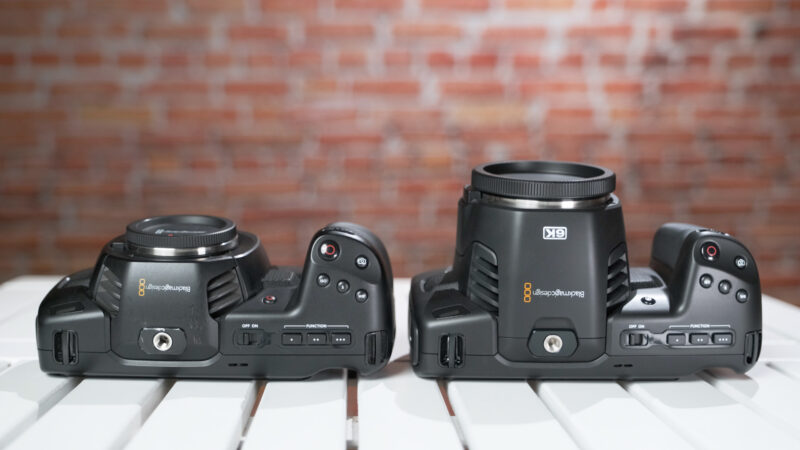
What are the pro’s and cons between the Blackmagic Pocket Cinema Camera 4k or 6k? Which One Should You Buy? We’ve been asked numerous times by people if they should buy a BlackMagic 4k or 6k camera? Now people probably don’t want to waste any money, so when it comes to bang for your buck the two best cameras on the market right now are the Blackmagic Pocket Cinema Camera 4k and 6k. But which one should you buy? Well in this article we’re going to break down these two cameras and we’ll tell you the differences and why we think one is actually a better buy than the other. First Impressions Of Blackmagic Pocket Cinema Camera? Let’s get into this and take a look at the Black magic pocket Cinema Camera 4k versus the pocket Cinema Camera 6k. Our first impressions of each of these two cameras are that they are absolutely amazing especially in what they do for the value, in our opinion we don’t think there’s anything that’s ever come out quite like these two cameras when it comes to being able to give you high resolution such as 4k or 6k and giving you the flexibility of raw in these bodies especially for their price points. There’s really nothing that compares to them other than each other so that’s why we’re going to look in this article, we’ll cover why each of these cameras are good what we don’t like about each of these two cameras and ultimately which of these two cameras you should be picking up. Does The BlackMagic Cameras Have Good Quality? We have used each of these cameras for quite a while so we’ve had some time to really test them out and so the first thing we want to jump into and probably the thing that you’re most interested in is quality. Now when it comes to the difference between the two in terms of quality you’re not just getting 6k as far as resolution with this model but you’re also getting a bigger sensor, so you are going to be getting a super 35 millimetre sensor compared to the micro 4/3 sensor, that’s going to allow you to get a couple different things, obviously the 6k resolution but also with a bigger sensor you also have more flexibility in low-light shooting. You have a bigger sensor so it allows for more surface area for light to actually hit the sensor to allow you to get better low-light performance. In a camera like the 4k that has already had great low-light up to this point the other big benefit when shooting with the 6k sensor is if you’re shooting for a 4k timeline, you now have some extra room as far as being able to reframe your shot in post. Now that extra 2k, is it really helpful? That’s going to totally be up to you and how much reframing you’re planning on. It’s not as big of a jump from 4k to 1080p but that little bit of extra reframing room is nice to have in the Edit. Can Your Computer Handle 6K Footage? Now another big question that pops up when shooting with 6k is well. Is 6k going to just wreck my computer? Will I even be able to play back the footage? We can say that yeah you actually can and it actually plays back really smooth. Now as far as looking at the 6k footage on a regular 1080 screen, whether you’re looking at the 6k versus the 4k on a 1080 screen on a cell phone screen and honestly we really couldn’t tell that big of a difference, yes the 6k was a little bit sharper and you know you may be able to tell the difference between these shots online but after compression and putting it back on a lower resolution screen realistically the difference between 4k and 6k really wasn’t that big, and so since there wasn’t a massive difference between the two. Another question we’ve been getting is since the 6k can only shoot 6k in BlackMagic Raw is it worth editing it in DaVinci? Or is it worth using that raw workflow?  Personally we think working with da Vinci hasn’t been the easiest thing, obviously it is a brand new software and no one has really mastered it yet and we really haven’t had enough time to really give our honest opinions on DaVinci just yet but we will say that when you were taking this file or when you’re taking the BlackMagic raw file into da Vinci, da Vinci handles it very well so there’s not a massive difference between the 4k and the 6k as far as the quality of these two cameras. Do The BlackMagic Cameras Have Good Usability? How’s the usability? And this is honestly where these two cameras differ the most. If you’re getting the black magic you should definitely just be getting it for raw which we do kind of believe to a certain extent. However when the 4k can shoot 4k ProRes and 4k raw but the 6k cannot shoot 4k raw it is a little bit of a bummer. Especially when you don’t necessarily always want to shoot in 6k, as we mentioned when you’re shooting in 6k on this camera in RAW you’re going to get frame file sizes that are about seven to eight gigs for a minute, but when you’re shooting in this guy in 4k raw you’re getting file sizes that are more like around 3.8 gigs to about 5 gigs or so which is significantly smaller. Especially when you start adding them up so sometimes you may not want to shoot in 6k, you might just want to shoot in 4k for the file sizes depending on what you’re shooting. That is one of the big issues that we have when it comes to shooting with either one of these cameras. Now as far as the menus

Read More

From The Blog

Tips on starting a small Company


No Comments

Here at Beast Production we have grown a Production Company from the ground up so we know it can be a struggle at first to get clients. So in today’s article we’re going to answer the question, “How do I go about getting clients for my UK Production Company?” We guess this applies to clients for any type of freelance work, so if you’re a photographer or offer any other creative video services this will apply to you as well. There are a whole bunch of ways you can go about getting new clients for your UK production company and were going to go over a handful of ways, some of which will be geared toward those of you who are beginners and want to get your first clients, and some of these will be helpful for those of you who are already experienced but want to branch out and find new clients so without further ado let’s get into some of these tips. A successful production company needs a creative portfolio The very first thing as a freelancer that you’re going to want to do whether it’s videos or photography is to set up a portfolio of some sort where you can show people the work that your UK production company has produced, and for this you will need a video hosting platform.  If you’re just starting out you can use YouTube, Vimeo, your own website or you can even use Instagram to show your videos.  A tip though is that if you’re going to use Instagram don’t make it your personal account that shows you and your friends goofing off because you don’t want clients to see that, keep it professional. Now you might be one of those people that says, well how do I make a video portfolio if I don’t have any existing videos from existing clients, and if this is the case then the only thing you can really do is to either shoot some videos for very cheap or for free. When we started out we shot tons of free work. We actually sent out emails to various small businesses and said, “hello we are Beast, a new creative force in the UK, we make videos were just starting out and we like your brand”, you now tell them a little bit about you or your production company, and then the icing on the cake is, “we would like to offer you a free video for your business and in return we would like to use it for our portfolio.” Every now and then you’ll be surprised that you will actually get a response and a lot of people like free stuff so if you’re offering a free video and your stuff is good, they will let you do it and boom you have your first client video. Throw it on your portfolio and then repeat the process again. Now that you have a portfolio and you have some stuff to show people this is where you can move onto some of the other ways you can go about getting some new clients and getting paid. One little thing we would say is a good amount of videos to have in your portfolio would be at least 5, obviously the more you have the better, but 5 is a good number when starting out. As we said now you have your portfolio you have a few videos that you can show people so that when they hire you to do some work they know what they’re getting into. You will also have gained a tremendous amount of experience in the process of those five video productions. And it will be that experience and knowledge along with your creative ability that will win you the next job. What Should You Value More, Goods Or Service? Now before you even start thinking about marketing and little tricks to find clients and things like that, you need to first structure your production company into two parts – Goods and Services. If you’ve ever taken a marketing class then you will know exactly what we are talking about. Goods are a tangible thing that someone can buy from you and they now have it and they own that thing. In this case that is the video the final product that you throw together and edit and send to them, that is the goods you are offering your clients. The service you are offering is exactly what it sounds like, the customer service, the relationship you are offering to the client and how attentive you are to their needs, how responsive you are and how you handle yourself in a professional way. This is equally if not more important than the actual video or whatever the good is itself because even if you provide a good final product if your service is bad then they’re not going to recommend you to anyone else. By the way, recommendations are very important when it comes to video production, so when you do have a satisfied customer, ask them to leave a google review. Also check Beast Los Angeles We would say a big chunk of our business comes from referrals because the clients not only like our work but they like us, they like how responsive we are to their emails they like how quickly we get back to them, they enjoy our willingness to meet up with them and discuss ideas with them and to collaborate. They enjoy how patient we are and how we can offer revisions to make sure that they get the video they want. These are the things you have to think about every time you take on a video production service in the UK for a client because in the past they’ve liked our service they’ve recommended us to all their friends, who also have businesses and do all sorts of things and we get emails and calls all the time from people that want

Read More

From The Blog

How To Set Up An E-commerce Business


No Comments

There is a growing trend for online independent retail, so we decided to write an article about how to set up an e-commerce business. So many people these days are looking for a side income or passive income as some say. A great way to do this is by starting up an e-commerce business, so in today’s article we are going to be covering the six steps that you need to follow when you are starting an e-commerce business. The steps we’ll cover will be: Step One: Research Step Two: Get A Domain Name Step Three: Choose A Product Step Four: See How You Can Differentiate From Your Competition Step Five Determine Your Customer Base Step Six: Create Your Store Step One: Research How to set up an e-commerce business Read up on the subject. Reading this article about “How to set up an e-Commerce Business” is a great start. But be sure to look for other articles like: “How To Set Up An E-commerce Shop” for example. Here are a few other common search terms that could be worth looking into; “How do I start an ecommerce business with no money?” and another question people are asking is, “What are the most successful e-commerce businesses?” Step two: Get A Domain Name Our First tip is to get a domain name, it’s very important for a successful ecommerce store to have one but a lot of people want to skip this step, they want to save the twelve pound a year. Not getting a domain name is not a smart decision, you want to get a good domain name. How Do You Know If Your Domain Is Good? What is a good domain name for an ecommerce store? well it needs to be easy to spell for one, if it’s hard to spell people are going to forget it and they’re not going to know how to spell it so you might say okay my company is XYZ whatever dot-com, but if people aren’t sure of the spelling of it they’re going to make a mistake and they’re just going to give up. On top of that it needs to be easy to remember like any business name it should also be easy to remember that’s not enough though it needs to include a keyword. If you’re new to online business online marketing you might not know what that means. Let us quickly explain it so let’s say you have a store and you’re selling peanut butter, you absolutely love peanut butter so you decide to sell it online so a really good domain name would be peanut butter.com but chances are it’s probably taken or probably really expensive and unless you’re a big company you probably can’t afford peanut butter.com, so a good example might be peanut butter lovers.com so Google knows that this website is about peanut-butter, people know that this website is about peanut butter and even more so they know it’s for peanut butter lovers and if they love peanut butter well they’re going to want to buy peanut butter online obviously. That’s a great domain name because it helps Google know what your website about it, also helps people know what your website is about. Don’t make your domain name super long if it’s too long people aren’t going to be able to spell it so they’re going to forget it. It’s also really bad for ranking high up on Google search results because Google knows if you have a really long domain name you’re probably not that serious.  Step Three: Choose A Product What products should I use for my store? Your product is the solution to a problem. The first thing that you need to know when starting an e-commerce business is that you’re not just creating a product, you’re solving a problem, the world does not need more products what it does need is better solutions to existing problems. One of the most common mistakes we see new entrepreneurs making again and again is creating a solution before identifying the problem, so before thinking what product can you sell first think about what problem can I solve. What we need to do is find a problem that you know exists or better yet you’ve experienced yourself. Ideally this will be a niche that you’re truly passionate about as this is going to be something that you want to be able to do day in day out for the foreseeable future. Find Your Problem To Solve Let’s use an example we are interested in protecting our shared environment for future generations this might be because a huge environmental issue is waste. The problem we would like our brand to solve is decreasing waste from everyday disposable items, so a good way to come up with your product type here is by turning your problem into a question, and your product into the answer to that question. In our example the question would be how can we decrease waste from everyday disposable items. One answer would be to make those items reusable, so now let’s start to think of some items that are used daily that are disposable that you could make reusable, so the first few things that come to mind just off the top of my head of razors, toothbrushes, takeaway coffee cups and straws. Now you want to begin to have a think and do some research around each potential product idea and which you think has the biggest market potential and which isn’t being done as well as the others. Let’s fast forward and go for the item of those which has the least market saturation which is disposable straws then we want to focus in and start to do some additional research around our problem and solution so we want to look into some of the facts and figures that you can focus on to highlight the problem of disposable straws. An estimated 500 million straws are used every day

Read More

From The Blog

How much does it cost to make an online video?


No Comments

Let’s just get straight into it one of the main questions that we get asked all the time. How much does video production cost? Or, “How do you price your video production?” It’s a difficult question to answer but in this article, we’ll try our best to answer, “How much do you charge for your videos?” And “How much should I charge for videos?” This article is going to address the costs associated with video production be it explainer videos, brand story video, corporate videos, online videos for social media or TV commercials.  We’re not going to be telling you all about how much we charge as a London Production Company that specialises in more high concept and high end video production. Were just going to give you all a few tips and things to take into consideration when you’re pricing your video production projects. The main things that they will price on a project is what you have to pay for your time and effort and also how much money you want to put into your pocket. We’re going to break these down in depth, these are the main things that you need to take into consideration when calculating how much will a video production will cost. Is there a pricing formula for a video production? Here is the pricing formula for a video production company. Hours spent working on pre-production Cost Talent costs and usage rights costs. Casting Location scouting Creative development Logistical Costs (Travel Etc.) Crew costs Catering Art Department Props Wardrobe Equipment costs Post-Production offline – number of editing days Post-production online – number of days for colour grading, VFX and sound mix How Much Profit You Want To Make Put all these factors together and you have a fair price to send over to your clients. Now lets make a cost breakdown for a typical video production inquiry. When we get an inquiry for a video project the first thing that we think about is the things that we are going to have to pay for. So let’s just say the client contacts you and they say they want to use Lamborghini in their brand story video that they want to shoot out in Los Angeles. They also want behind-the-scenes content, they wanted to be shot on a Red DSMC2 or Arri Alexxa Cinema camera, they need a techno crane and they also need a drone. The first thing that we’re going to get into is renting equipment, paying the crew, flights & hotels, talent, wardrobe and props. Were also going to have to contact someone out in Los Angeles for location permits and casting, so were going to also have to pay them, we are also going to need a all the equipment and specialized crew associated with the techno crane. All of this sits in the section of what we have to pay for the video production on the day of shooting. 1.How Much Does it cost to Rent video Equipment? Here are some typical video equipment rental costs: Camera Rental Prices Arri Alexxa Mini £350 RED DSMC2 Dragon X 5K £250 SONY FS55 £150 SONY FS7 £150 Blackmagic Pocket Cinema Camera 6K £100 DSLR SONY A7 III, GH5 £50 Lens Rental Prices Zeiss Ultra Primes full set £450 Cooke S3 full set £500 Leica Summicron Full set £150 Zeiss CP.2 Full Set £200 Light: Small light package  £ 500 3x led panels 1x 1.8 HMI V-locks Extension lines Lightstands x 4 Frames 1.5×1.5 Frost and Gels Grip  £500 Wally dolly Kessler Slider pod Dji Ronin M Sachtler tripod and Fluid head Special Grip £5500 Techno crane Remote Head Crew x 4 Special Prop £5000 Lamborghini Precision Driver Detailing Crew Insurance     2.What are the logistic costs for a production company that needs to shoot an online video in Los Angeles? You have to work remotely with your production manager in the location where you want to shoot. When there is an 8hr time difference this results in much longer days for both sets of crew. So keep this in mind. After that you have the usual costs: Airport Transfers Flights Excess bagage Equipment Carnet Hotels Sustenance Per diems Float     3.How Much Does A Videographer Cost? For the behind the scenes video you will need to hire a videographer. Now we can’t really put an exact price on a videographer as it would depend on who you hire, but perhaps a good estimation would be £1,000 for a more experienced videographer compared to £300 for a beginner. That’s the day rate for shooting, but then you need to add on a cost for editing. So typically a behind the scenes video for a one day shoot will cost anything from £1,500 to £5000.     4.How Should I Price My Time And Effort? The next thing is our time and effort so we would say how much time and effort does this project entail? The shoot times are going to extend over a course of four days including the scouting and technical recce.  We also have to write a script for the story that the client wants to tell throughout the video.  Essentially you need to work out how many people and for how many days will be working on the pre-production. Best advise is whatever you estimate it will be more. However, if you price it correctly you probably wont be com putative and you wont win the job. So this is where you have to bite the bullet and just get it done as best as you can. We all do it. Pick a number, hold your breath and hope for the best. It all comes down to personel. Pick the best people for the job and you will get it done in less time with less mistakes – and that means more profit.     5. How Long Does It Take To Edit An Online Video? We also have to account for the time that it’s

Read More

From The Blog

The 12 steps of Post-Production explained


No Comments

At Beast we often get asked, what is the process when it comes to Post-Production? There are three phases of filmmaking: pre-production production post-production. Here’s an outline, from UK Production Company Beast London, about the 12 steps of post-production in film making. Pre-Production Almost all filmmakers are in a continuous cycle of pre-production. Pre-production is the phase where you try and prove everybody that your film is about to start shooting. It’s the distressing phase where you wait for financial promises to appear in your bank, and for cast and crew to come to an agreement that they will certainly turn up. ‘Actual’ pre-production is when you’re paying for script development, casting, scouting and securing crew. To be honest, pre-production is not difficult. Production The second phase is production. This refers to the actual shooting days. Shooting days for commercials are typically 1-3 shooting days. For movie production the usual number of minimum days would be around 20days and can go up to 70 or 80 days for big budget movies. During video production everything takes place at once- the schedule, filming, coaching actors, setting up lights, preparing the camera, propping, set-dressing, hair and make up and much more. Production, although usually taken as being fun and blissful, will perhaps be the worst days your life. Like moving house, it is something that you choose to do and put all of your money and effort into but it is incredibly stressful and exhausting. But you continue. Somehow your film is ready. It’s time to celebrate. Everyone hugs everyone, and they breathe collective sigh of relief that it wasn’t a complete disaster and then they all go home. Post-Production Now you are faced with a mountain of rushes. Hours upon hours of video rushes. This is exactly when you begin with post-production. And this is when it pays off using a London video production company, with their experience and guarantee of professional quality post-production and end results. The 12 Steps of Post-Production Choose An Editing Format There are two ways in which post-production can be done. One is the old way- the film way and the other one is the digital way. The choice is completely yours and should be made wisely. The film way lets you shoot film and edit, or join film on film editing equipment. It’s rare and outdated and few filmmakers edit this way today. The electronic or digital way gets all your footages digitized (if shot on film you will have to get them scanned to a digital format). No matter which format you choose, the steps involved are more or less the same. Hire A Picture Editor Your cinematographer is somebody who’ll be able to give you decent recommendations for an editor. An editor’s work is to produce an Edit Decision List (EDL). The editor will go through your script and look at the footages, and with this info, trim the film according to their outlook of what makes the story superior. Since it’s a huge creative responsibility, it’s advised to get an editor well before the project enters into the production phase. A worthy editor is the one who advises on the types of shots he will need, and gives valuable advice on tricky post-production matters beforehand. The standard schedule for editing a feature is 7 – 8 weeks. During this time, your editor will make different drafts of your flick. The first draft is the Rough Cut, and the last one is the Answer Print. Editing is aimed towards being contented with the visuals (locking picture) and sound (sound lock). Hire A Sound Editor Now, about 8 weeks later, the visual film is ready but you need to boost the look with sound. Therefore, you’ll need to hire a sound editor and an assistant for 5-6 weeks. His job will be to: trim dialogue tracks rebuild sound effects get cue sheets done to make things easier in Step 6 (The Mix). Do ADR & Foley ADR stands for Automatic Dialogue Replacement. This will land you and all the actors in a large hollow room with a projector that displays your latest picture draft from Step 2. The actors will have to lip sync and loop dialogues that weren’t sharp and clear. Foley involves going to a room that looks like the ADR room but this time, without actors. Sound people called Foley Artists or ‘walkers’ will help you put certain other sound effects (like the noise of footsteps etc.) into your film. Lock Music For many first timers, cutting costs on music can be a tempting choice, but if you have chosen a top production company UK then be assured that music will be a top priority. First off, there are a couple of things that you should avoid while securing music. Do not fill any popular (or unpopular) old songs that you haven’t obtained the rights to. Do not use any pre-cleared CD-ROM music as it won’t be good enough on quality. Hire a musician who has his own studio to compose original songs and tunes that you have the copyrights to. The Mix (Re-recording) Once you’re left with 30-40 tracks of sound, which include all the dialogues, ADRs, Foleys and music, you must cover them on top of each other to falsely create a sense of sound with immense depth. This is called the Mix or the re-recording session. Get Music & Effects Somewhere in the near future, you will hopefully be selling the rights to your film to foreign nations. The distributor/buyer in that nation would want a sound track with no dialogues so they can dub the dialogues accordingly. Get Your Titles Your editing is almost done. All you need are the final pieces for the answer print. The first three pieces to get are your 6-8 Opening Title Cards followed by Rear Title Crawl. These titles are then attached to the master track. Create A DCP You will need to create a DCP (Digital Cinema Package) in order

Read More

From The Blog

Can you create best videos with an iPhone ?


No Comments

Did you ever wonder if you could shoot best videos with just an iPhone? Well there’s a little computer tech company called, Apple, they shoot almost all of their video content marketing for their iPhones on the iPhones themselves. In fact one of our favourite videos from Apple from 2019 was this brilliantly shot snowball fight, “SNOWBRAWL“. As technology has progressed over time the number of new apps to help someone create content has gone up. Not only can people just edit a photo for their instagram they can now animate, film and edit a whole video production. But just how can you do it ? Well below we’ll show how you can create a video production with your phone (These tips don’t just go for iPhone they go for any phone, although some app names may change,) There are so many examples of great projects made using just an iPhone, a YouTube search is all you need to do to see what people are capable of. A lot of the iPhone adverts now claim to be made on only iPhone however Apple never mention if there has been any additional equipment used. The best way to film on an iPhone is the apple standard camera app, while some features are limited it has the basics there to get filming done, the only problem you may have is that some sliders are limited which means if you need to change anything mid shot, whether that’s brightness or something similar, you’re incredible limited, there are a few ways around this however. There are apps on the app store that allow you more control over the camera. An example of something like this would be ProCamera, this app provides a more detailed interface in which the user can have more control of their videos with controls ranging from iso & shutter to histogram and white balance. You can also export files in a RAW format. The app also has live filters which may be more suited to fun projects however if you are filming any professional videos i.e. corporate videos, it would perhaps be something to skip. While the app does cost $5.99 with a rating of 4.6/5 stars it’s definitely worth a punt. Whatever app you use, if you get it right the quality of your filming before editing will be second to none. To film footage on an iPhone it’s not hard at all. All you’ve got to do is press the record button and capture what you want. A tripod is a great addition to any setup and just because you are filming on an iPhone, doesn’t mean that you should be lazy. When it comes to audio it’s quite easy to capture crisp audio, the audio recorder on the normal camera app is alright, it does the job well but don’t expect too much quality if your in a windy environment. For the best quality it would be recommended to use a mic with a filter on it, one mic that works with a phone would be the rode videomic me L. It’s an affordable mic that works with all iphones with a lighting cable. An alternate to this would be a lavalier microphone, however one flaw to this would be the wires however there’s plenty of ways about it. One app that may help you with your audio is AudioShare while it does not have the necessary editing tools such as cut, copy and paste functions. If you want to edit your audio and add effects, you have to do it in a different application then import to Audioshare. But for the organization of your tracks and audio files, it’s the best application to do that. When it comes to editing your productions there are a plethora of apps to help you edit your footage. One example would be imovie. It comes with iPhones now so won’t cost you a penny, its set up like your usual video editor with a timeline. Its easy to use with a simple drag and drop format with pre loaded effects and transitions, however whether you choose to use these just depends on the type of production you’re making, like most things mentioned though it is still relatively basic and you will never have the same amount of options as you would on a desktop project. Another alternative to iMovie would be Adobe Premiere Rush, this is essentially a sister app to the main premiere pro cc. Again it comes down to the problem that it’s not as in depth as the main app, this is because the app is mainly marketing towards social media stars so it has a simple workflow so it’s more fitting for simple projects like corporate videos as these require less cuts and next to no effects. When it comes to exporting your final project it’s really easy and you have quite a few options, should you choose to upload it straight away to either Facebook twitter or YouTube or export it in many of the usual file types (MP4,Mov etc.) If you don’t want to upload your project straight away just export it in the setting you like and it’s possible to upload it to any social media at a later date, the only apps you need for that are the files app and the social media app that you want to upload the video to In conclusion it’s really simple to create your own video production using just a phone, while your still able to create a production of very good quality it still won’t be up to the standard of a full blown professional production, but If your just getting started off on your videographyjourney it’s a great way to get clients and build up your portfolio before you can afford better equipment. Making content productions with an iPhone is better for some genres then others though, as previously mentioned with the editing side of things, corporate videos are great to make

Read More